> ## Documentation Index
> Fetch the complete documentation index at: https://docs.sherloqdata.io/llms.txt
> Use this file to discover all available pages before exploring further.
# Keyboard Shorcuts
> Keyboard shortcuts directly on your SQL and code editor
Sherloq seamlessly integrates with your editor, allowing you to streamline your workflow and enhance productivity with powerful keyboard shortcuts.
Below is a list of available shortcuts and their functionalities:
## Save Query from Editor
To save a query directly from the editor:
1. Highlight the text you want to save.
2. Right-click and select **Save in Sherloq**, or use the keyboard shortcut:
* **Cmd/Ctrl + Shift + 9**
3. Sherloq will open and save the query.
Learn more about saving queries [here](https://docs.sherloqdata.io/newquery).
## Update an Existing Query
To update a previously saved query:
1. Highlight the text you want to update.
2. Right-click and select **Update Query**, or use the keyboard shortcut:
* **Cmd/Ctrl + Shift + 7**
3. A list of your recent queries will appear, prioritizing the most recently created, viewed, or copied queries for quick access.
Learn more about updating queries [here](https://docs.sherloqdata.io/updatequery).
## Snippets code insertion
To quickly insert stored queries as snippets:
1. Type **`@@`** in the editor.
2. A list of your saved Sherloq queries will appear, ordered by recent activity and customization.
3. Press **Enter** to insert the selected query.
**Tip:** You can create **sub-queries** for commonly used clauses (e.g., `WHERE` or `JOIN` conditions) to speed up query writing and enhance productivity.
Learn more about snippets [here](https://docs.sherloqdata.io/snippets).
## SQL Formatting
To format SQL queries for improved readability:
1. Right-click and select **Format Query**, or use the keyboard shortcut:
* **Cmd/Ctrl + Shift + 0**
2. The code will be beautified with proper indentation and structure.
Learn more about formatting [here](https://docs.sherloqdata.io/formatting).
## Keyboard Shortcuts Not Working?
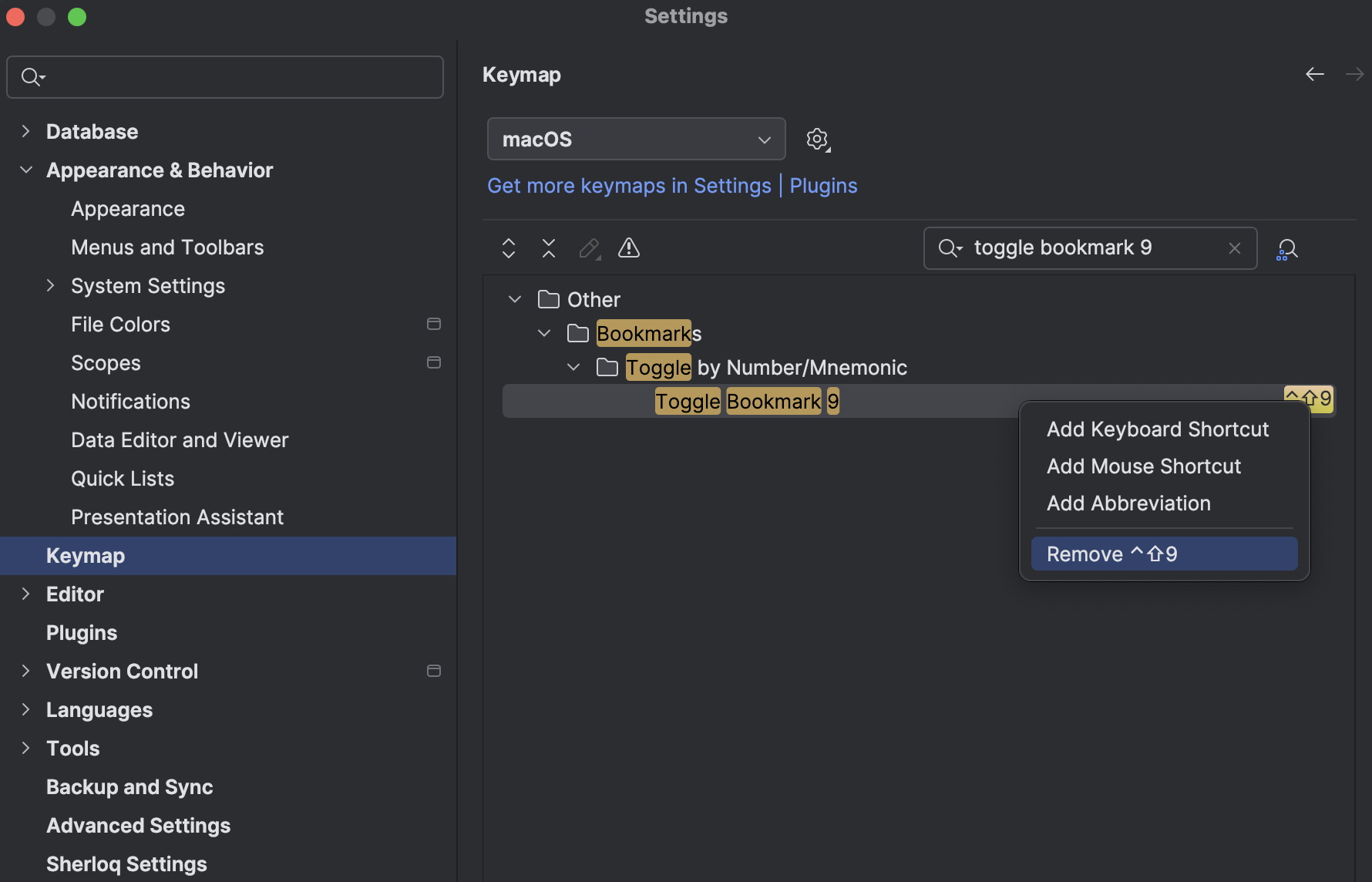
If your keyboard shortcuts are not working, it could be due to conflicts with multiple editors using the same key combinations. You can modify or remove conflicting shortcuts in **VS Code** and **DataGrip** by following these steps:
1. Open **Settings**.
2. Navigate to **Keymap**.
3. Use the search bar to filter for **"toggle bookmark"**.
4. Right-click the conflicting shortcut and select **Remove** to free up the key combination for Sherloq.
Once removed, you can use the Sherloq shortcuts as intended without conflicts.
 Need more help? Visit our [help center](https://docs.sherloqdata.io/contactus).
***
Need more help? Visit our [help center](https://docs.sherloqdata.io/contactus).
***